GoAccess parsing issues resolved

Since Webalizer fell into disrepair some years ago, I dabbled with GoAccess for website stats and sort of got it working. Several OS or Apache updates later it decided to stop working and I never found the time to fix.

Well, todays persistent rain and nothing better to do, I resolved to fix why GoAccess refused to parse my Apache logs.

The initial fault seemed to stem from GoAccess not being able to decide if I had CLF ( Common Log Format) or Combined Log Format. Apache was insistent that I had set Combined Log Format looking at httpd.conf, but GoAccess complained on start-up that this was not the case.

As this is a hobby server and I had not needed to rotate the logs for several years I can only guess the httpd-access.log had been corrupted or mixed with CLF at some point, so a forced log rotation stopped the error messages on startup and allowed the basic details of the log to be parsed.

However the referrer and user agent still was not parsed. It seems there is a error in the sample goaccess.conf file and the %R and %u fields need double quotes to be parsed fully. A post way back from 2014 seemed to flag this but the MAN page still does not pick this up, maybe its a FreeBSD specific issues

Anyhoo, fixing this is the Combined Log file format parse string now has the file being parsed happily. The OS and Browser detections still seem a bit pants, Safari and Apple iOS and MacOS seemed to be lumped under Linux, but job for another day.

The analytics can be found here

Solved – MYSQL refusing to start

I had upgraded my version of Mysql Server via the ports a few weeks back and usually ports is very good at addressing any compatibility issues bumping up the versions. A quick read of UPDATING had not flagged any real concerns, but on the reboot Mysql was steadfastly refusing to start. No obvious error messages where thrown and it just silently refused to budge.

Googling presented several solutions, but none palpable (wipe config and dbs and start again). However one suggestion was to check the {hostname}.err file contained within /var/db/mysql and lo and behold a quick TAIL {hostname}.err displayed the error that I have been missing. Namely that query_cache_type=0 and query_cache_size=0 had been deprecated starting with v8 and needed to be deleted from my.cnf file.

Fixing the my.cnf file and a quick service mysql-server start restored my Databases and we are back up and running.

Updating Ruby via Ports

Oh I do hate /usr/ports/UPDATING when they refer you to an entry 3 years prior on how to update the current version of a major revision bump and then you need to dig out and correct the numbers to make it work. So I am just going to down my editing here so I can find more easily.

  If you use portmaster, install new ruby, then rebuild all ports that depend on ruby:

cd /usr/ports/lang/ruby31 and Make install

  # portmaster -o lang/ruby31 lang/ruby30

  # portmaster -R -r ruby-3.1

Upgrade decided

With all the furore over log4J and JNDI decided it was time to take the plunge and force the update thru. Although I wasn’t running Log4J there are probably a heap of software out there that will need to be bumped to the latest and greatest, so it seemed sensible to opt for Release 14, given its now on the point 4 update so all the major issues should be ironed out.

Server is mid-update as I type and is going smoothly,

Biggest issue was getting all the ports up to date before I started as a couple of Python related ports where being stubborn, looking for a packaging update to >20, but Postmaster could not seem to find the required dependency. Turns out installing or updating py-packaging made the necessary fix and now all the ports are building nicely I can attempt the OS update as everything will need to be rebuilt again from ports.

LetsEncrypt update failures

As the server is hosted from home, sometime the droning of the Hard Drive and fans annoys me and as I only host this for fun and self learning it occasionally gets turned of. This meant it missed the Cron Jobs that that should have replaced the cert long before renewal date.

Added to that, when I moved I locked down the router config and only allowed port 443 thru to the webserver to only permit TLS/SSL traffic and not plain HTTP. In the main this has worked well, but also meant the certbot script failed to renew the cert on demand as it could not write to the .wellknown folder on port 80.

So, now port forwarded port 80 to the server and the certificate has updated as required.

Not much going on

Been rather busy with work, and when I am done, not wanted to sit in front of a different laptop and while away even more hours. Therefore updates to the site and various tech around the house has been rather slow.

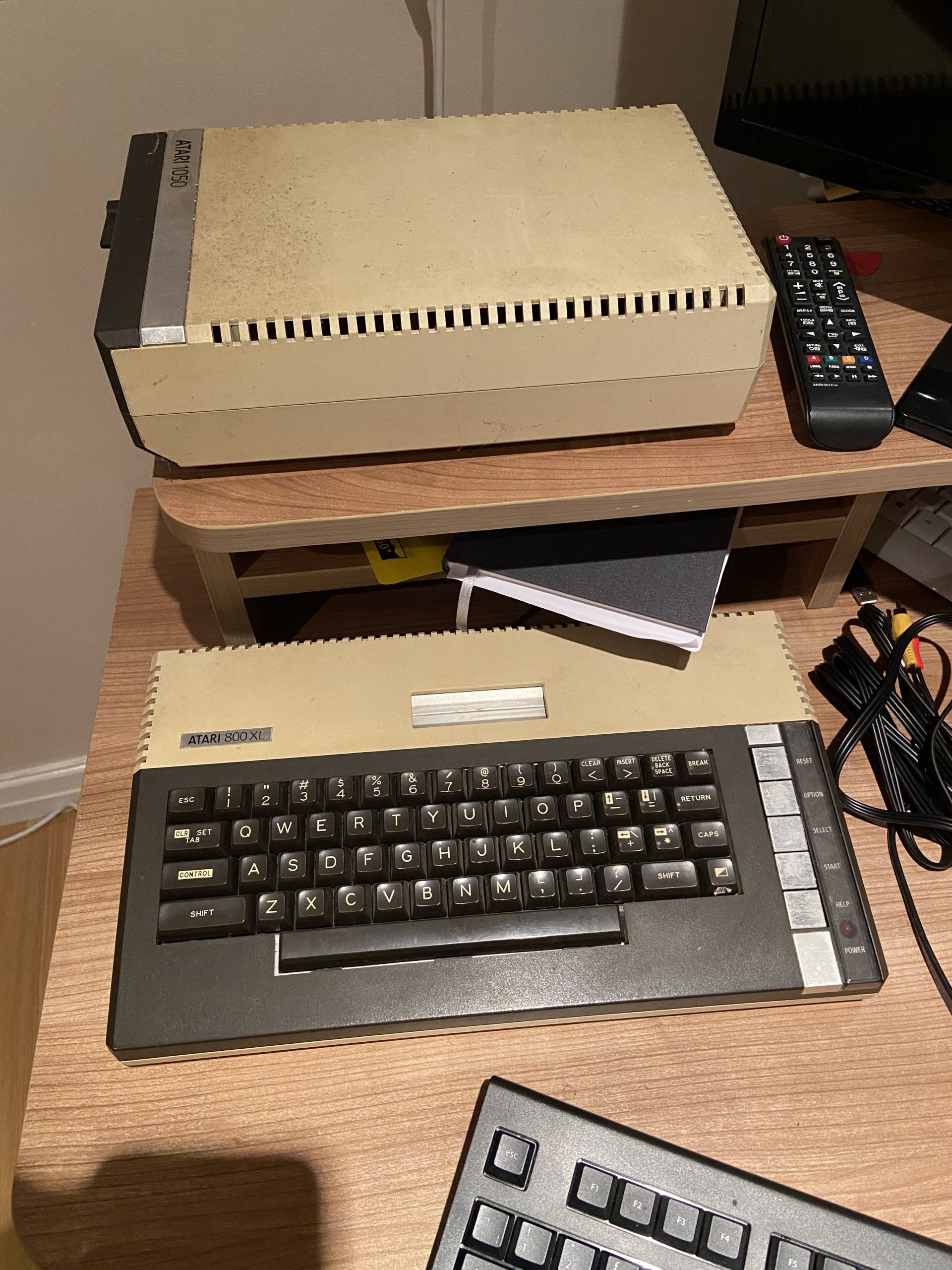
I guess biggest success was retrieving the old Atari 800XL from the loft with the 1050 5.25″ Floppy Drive and seeing the thing boot up 1st time in over 10 years. Almost 25 year old tech… Been meaning to dig out the old games and play, but both joysticks seem worse for wear and not survived the many years of inaction.

Dropzone – more practice recommended…

Atari800XL

Apple Watch 6 fails to install data plan

Was lucky enough to order and take delivery of the new Apple Watch 6 on launch day, but joy slightly tempered by ongoing issues to transfer my 4G data plan from the old Series 3 to the new device.

Various calls to EE, my network provider so far have been unable to resolve, despite various resetting of the watch and phone settings to get it working.

Only really a pain when out running, as I don’t take my phone so missed SMS and other alerts. Apparentlty a known issue, but not helping me much….

AppleTV – new toys

Sorting out the house over the summer I came across an old AppleTV Gen 2 box. Its long since gave up getting updates and logging into the damn things proved a trial as its too old to recognize 2FA logins.
Some googling threw up the fact you can still do this, but have to append the generate 2FA code to your password in the password field.

This unlocked my iCloud so I could bring up my Camera Roll and finally accessed all the photos I have taken over the years from my phone. Too many don’t make it into proper albums or printed, but watching them back brings back happy memories of holidays and days out.


A bonus byproduct of this trial of viewing old photos, which I had hooked into the AV AMP under the telly, was the music quality that was being pumped out alongside the pictures. Being a Gen2 AppleTv, though the pictures although good did not match the audio quality, being a max of 720 lines.. not even full HD.

A quick trawl of Amazon turned up the AppleTV 4K 64Gb model on a next day delivery with payments spread over 5 months.. Not quite an impulse purchase, but now I have access to all of the Apple content and HQ music and easy access to all the family photos for not much more that a good quality digital photo frames of not so long ago.

the TvOS has come along way since the original device, so will probably penlty of playing with the new apps and settings to get things just right.